You ask ChatGPT to open your friend’s eyes in a photo. The eyes come back open, but the smile is a bit wider, the nose looks different and there’s a lamp in the background that wasn’t there before. Your friend still looks like a person, just not quite like your friend.
That has a name. It’s called drift.
What is image drift?
Drift is everything that changes in your photo that you didn’t ask for. You asked for open eyes, so the eyes are the edit. A new jawline, a different hand or an extra lamp is drift.
A little drift is easy to miss. A lot of it is how you end up with a picture of your mom that doesn’t look like your mom.
Why does ChatGPT do this?
Think of it like asking an artist to copy your photo by hand and add one change. Even a great artist won’t copy every detail perfectly. That’s roughly what ChatGPT does. It doesn’t touch up your photo. It paints a new one that looks like it, with your change added.
Most of the picture comes out close enough. Faces are the exception, because we notice the smallest differences in people we know.
It gets worse the more you edit. Each new request starts from ChatGPT’s copy, not your original, so the small mistakes pile up. It’s like a photocopy of a photocopy.
We tested it
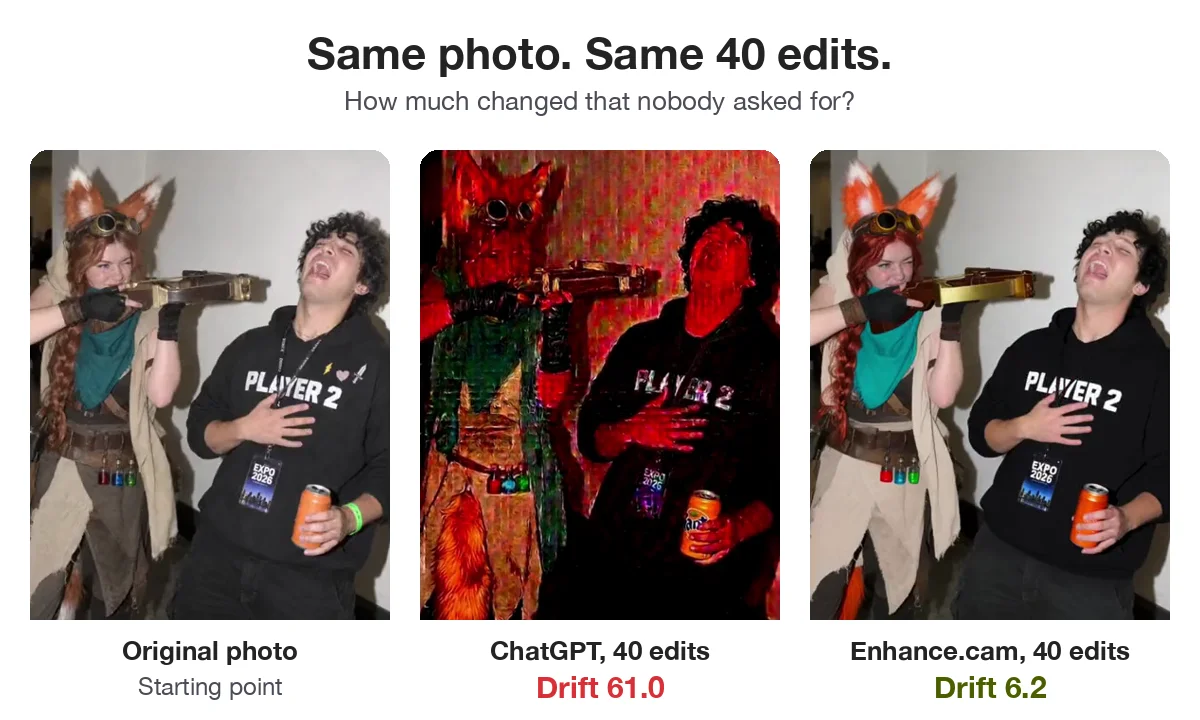
We gave ChatGPT and Enhance.cam the same photo and asked both for the same 40 small changes, one after the other, things like “make his hair black again”. The number in the corner of each side shows how much the photo has changed from the original.
By the end, ChatGPT’s version is red, blurry and hard to recognize. Enhance.cam’s still looks like the same two people.
What about OpenAI’s invisible watermark?
OpenAI says that images made with ChatGPT now carry an invisible watermark, a hidden mark inside the image that lets tools detect it was made with AI. You can’t see it, and OpenAI doesn’t say it affects how the photo looks.
We wonder if it plays a part anyway. Every time you edit, you get a brand new image with a brand new hidden mark added on top of the last one. After 40 rounds, that could add up. This is our guess, not something we’ve proven.
One thing is certain: the photo ChatGPT gives back counts as an AI image. A family photo where you only fixed a blink can get flagged as AI-generated.
How Enhance.cam avoids drift
Each Enhance.cam tool does one job. The open eyes tool fixes eyes, acne removal fixes skin and the dark photo fixer fixes lighting. They change the part you asked about and leave everything else alone.
So you can open someone’s eyes and then change the background, and the face stays the same.
When drift doesn’t matter
If you want a cartoon version of your selfie or a scene that never happened, ChatGPT is great, and drift is part of the fun. It only becomes a problem when you want to fix a real photo of a real person.
Tips to avoid drift
Always edit from your original photo, not from the last AI version. Ask for one change at a time. Before you share, zoom in on the eyes and teeth, since that’s where something looking off is easiest to notice.
Got a photo with a blink, a pimple or bad lighting? Try one edit on it. The first ones are free.